
Customer relationships are hard to manage when every team sees a different version of the account. Coalesce360 gives sales, delivery, support, and leadership a shared view of customer activity.
The customer module is not just a contact database. It is the operating record that connects opportunities, service work, delivery activity, support tickets, documents, and follow-up so teams can respond with better context.
See the customer module
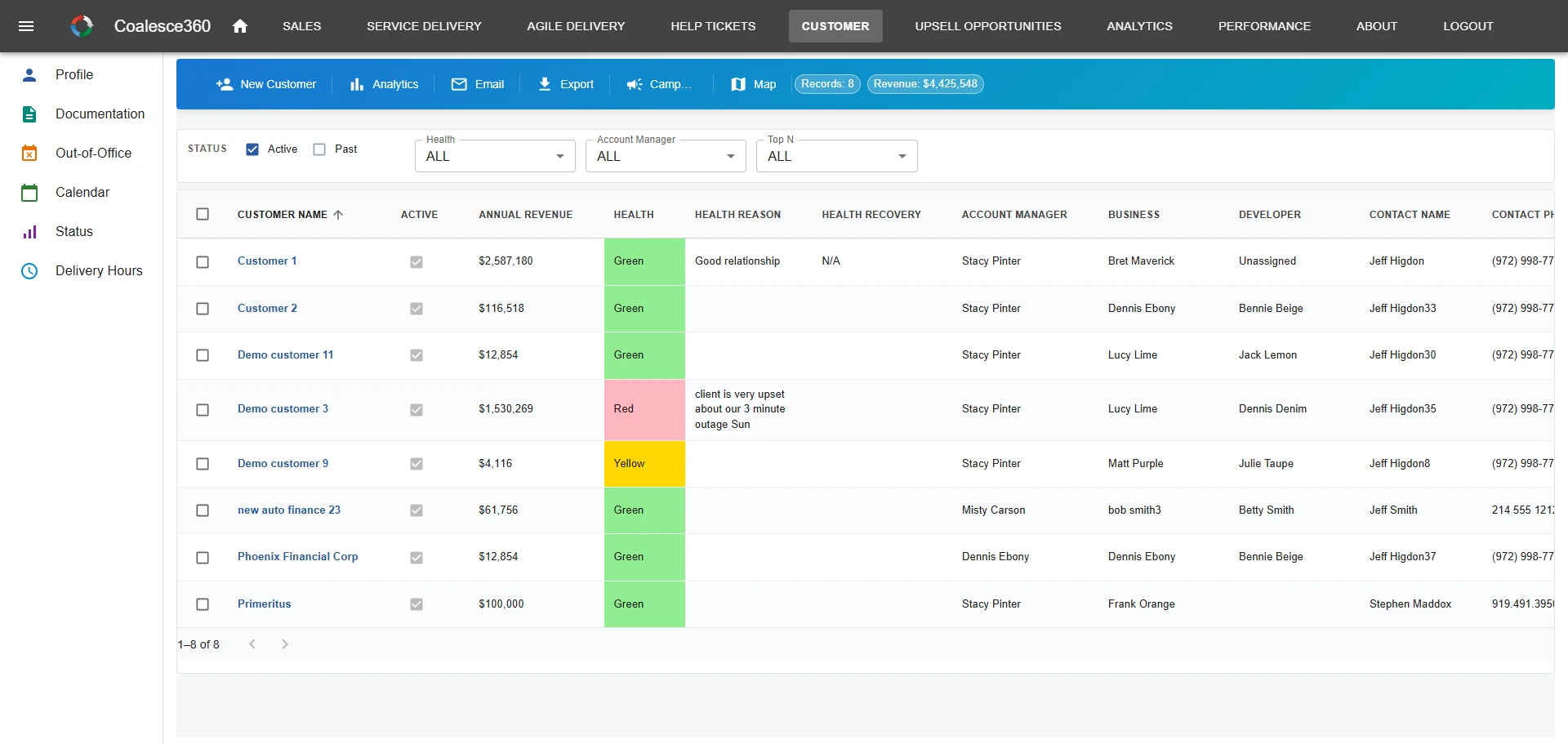
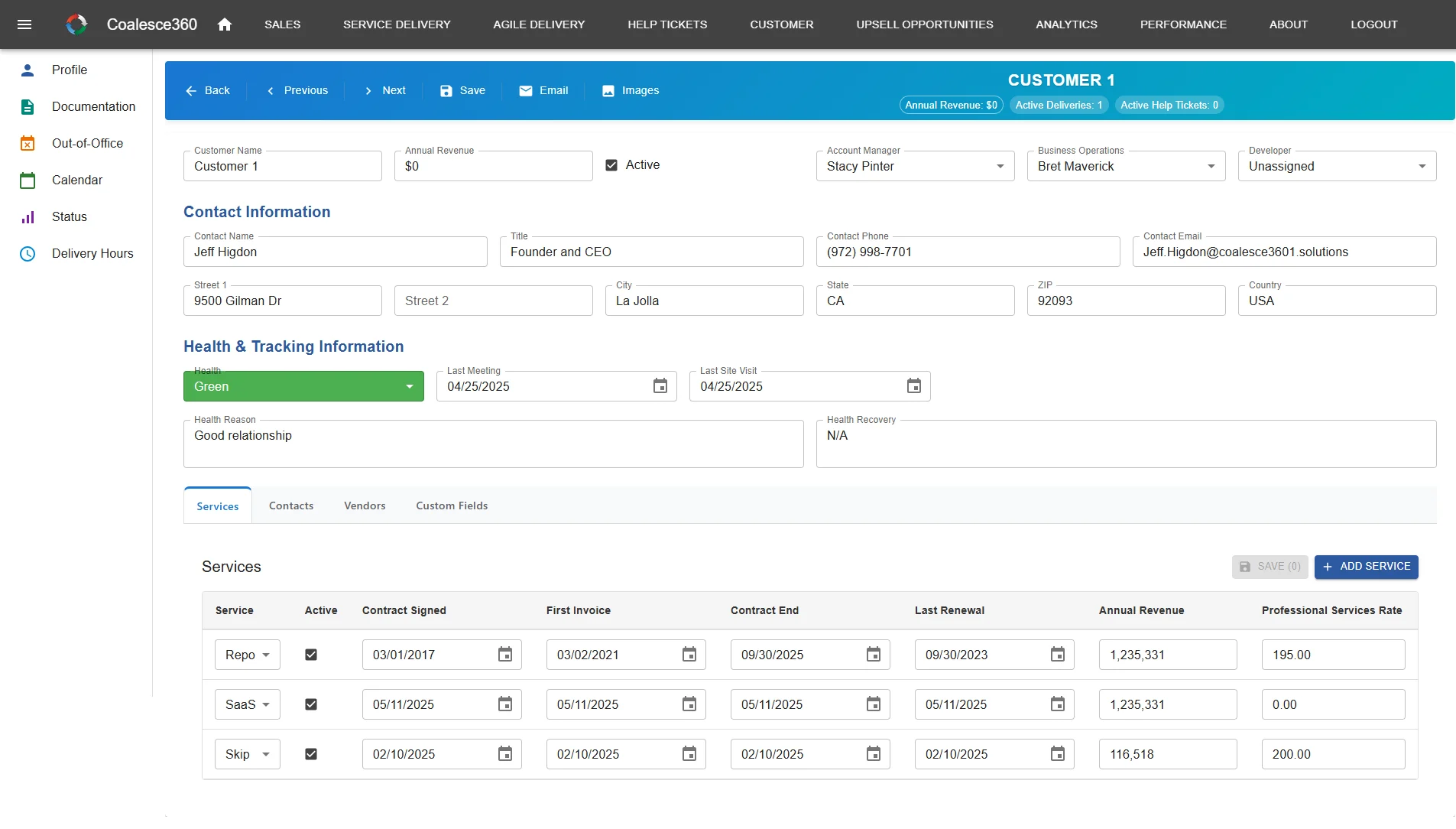
Shared account views and customer detail screens that connect sales, delivery, and support context.
Why shared customer context matters
Customer problems often start when information is split across departments. Coalesce360 keeps the relationship easier to understand.
Better handoffs
Sales context, delivery commitments, and support issues can stay connected to the same customer record.
Stronger retention visibility
Teams can see open work, unresolved issues, service history, and follow-up needs before risk grows.
Less duplicate data
Customer records do not need to be recreated across customer relationship management (CRM), project, support, and spreadsheet tools.
What teams manage in Coalesce360
The customer module gives teams a practical operating view of accounts and relationships.
Customer profiles
Maintain account details, contacts, ownership, notes, relationship history, and service context.
Account activity
Connect sales activity, delivery work, open issues, support requests, and follow-up tasks.
Customer visibility
Give account managers, delivery teams, support teams, and leaders role-aware views of the same customer picture.
Retention and risk signals
Spot accounts that need attention based on open tickets, unresolved commitments, delayed work, or follow-up gaps.
Connected documents
Keep estimates, sign-offs, attachments, and related operational records easier to find.
Cross-module context
Move from customer profile to opportunities, projects, tickets, and change activity without losing context.
Disconnected customer data vs Coalesce360
Customer management works best when it connects the teams that touch the customer.
| Need | Disconnected tools | Coalesce360 approach |
|---|---|---|
| Account history | Each team keeps its own notes and context. | Customer history is easier to share across teams. |
| Support context | Tickets are separate from account and delivery visibility. | Tickets can stay connected to customer and operational context. |
| Delivery visibility | Project commitments are not visible to sales or support. | Delivery work can be tied to the customer record. |
| Retention risk | Risk signals are discovered late or through meetings. | Open work and service history help teams see risk sooner. |
CRM contact record vs one customer picture
A CRM contact record stores accounts, contacts, and sales history. Coalesce360 keeps that CRM-style picture and attaches delivery work, tickets, and related change activity to the same customer so sales, delivery, and support are not maintaining three versions of the relationship.
Company size is not the filter. The filter is whether account managers, delivery, support, operations, and leadership need the same customer context.
Who benefits from customer management in Coalesce360
The module is useful for teams that need customer context across more than one department.
- Account managers who need current customer history before conversations.
- Delivery teams that need to understand what was promised and what is open.
- Support teams that need service context before responding.
- Leaders who need visibility into customer health, workload, and risk.
- Organizations replacing separate CRM, support, and delivery records.
What improves day to day
The customer module helps teams coordinate around one relationship instead of several partial records.
- Fewer customer questions repeated across teams.
- Cleaner handoffs from sales to delivery and support.
- Better visibility into unresolved work and account risk.
- More reliable customer reporting.
- A stronger foundation for retention and growth conversations.
Frequently Asked Questions
What is customer management software?
Customer management software helps teams maintain customer profiles, contacts, account history, service activity, follow-up tasks, and relationship visibility.
Is Coalesce360 a CRM?
Coalesce360 includes CRM-style customer and sales functionality, but it also connects customers to delivery, support, approvals, reporting, and production change workflows.
Can support tickets connect to customer records?
Yes. Coalesce360 is designed so help tickets can remain visible in the broader customer and operational context.
How does customer management help retention?
It helps teams see open issues, service history, delayed work, and follow-up needs before they become larger retention risks.
Who uses the customer module?
Sales, account management, delivery, support, operations, and leadership teams can all use customer views based on their roles.
Is Coalesce360 a CRM for small teams?
Coalesce360 includes CRM-style customer and sales records, but it is not a small-team CRM. It is built for teams that need one customer picture across sales, delivery, support, and operations—not contacts and pipeline alone.
Need one shared view of your customers?
Use Coalesce360 to connect customer history, sales activity, delivery work, support tickets, and operational follow-up.